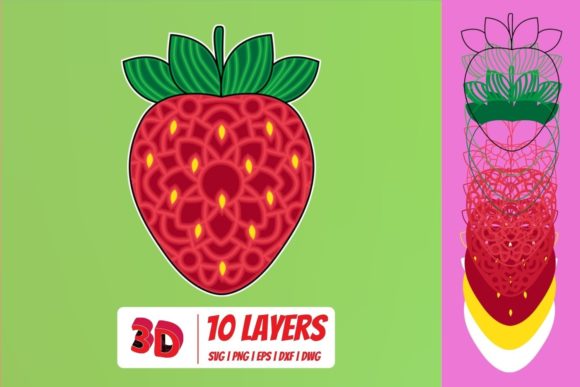
3D Strawberry SVG Cut File
A 3D Strawberry SVG Cut File is more than just a digital image; it is a precise vector blueprint designed to transform flat materials into dimensional, visually striking crafts. Whether you are looking to add a pop of color to a tumbler, create an intricate layer cake for a birthday card, or design a unique decal for your laptop, understanding the technical nuances of this file type is essential for success. The appeal lies in its ability to simulate depth and volume through layered cutting, but achieving that professional "pop" requires more than just hitting the print button. It demands an understanding of file formats, software compatibility, and material properties.
The market is saturated with digital downloads, yet many creators find themselves frustrated when their final product looks flat or misaligned compared to the preview images. This often stems from a misunderstanding of what a 3D effect actually entails in the context of cut files. Unlike a standard 2D silhouette, a 3D strawberry design relies on multiple overlapping layers—typically the body, leaves, seeds, and highlights—each cut from different materials or colors to create shadow and dimension. If you are new to this process, knowing exactly what you are downloading and how to manipulate those layers is the difference between a disappointing craft project and a stunning piece of art.
Navigating File Formats: More Than Just SVG
When you purchase a 3D Strawberry SVG Cut File Download, you are rarely getting just one file. A comprehensive package typically includes a zipped folder containing SVG, DXF, PNG, and EPS formats. Each serves a distinct purpose, and using the wrong format can lead to compatibility headaches or poor-quality outputs. Many beginners assume that because they have a Cricut machine, they only need the SVG file. While true for most modern workflows, having access to the other formats ensures flexibility across different devices and software environments.
The SVG (Scalable Vector Graphics) format is the gold standard for digital cutting machines. It is editable, meaning you can resize, recolor, and rearrange the individual layers within the design without losing quality. This format is compatible with Cricut Design Space, Silhouette Designer Edition, Make the Cut (MTC), Sure Cuts A Lot (SCAL), and Brother’s Scan and Cut “Canvas” software. If you are using any of these platforms, the SVG is your primary tool for sending designs to the cutter.
However, not everyone uses the latest software. Users of Silhouette Basic Edition may find that some advanced SVG features are restricted or unsupported. In such cases, the included DXF (Drawing Exchange Format) becomes invaluable. DXF files are widely accepted by older or basic versions of cutting software, ensuring that even if your software suite is limited, you can still utilize the intricate layering of the 3D strawberry design. Always check your software version before assuming the SVG will open seamlessly.
For graphic designers who prefer working in desktop publishing environments, the EPS (Encapsulated PostScript) file is crucial. This format is native to CorelDraw, Inkscape, and Adobe Illustrator. EPS files preserve vector data while allowing for complex editing that might be cumbersome in cutting-specific software. If you plan to integrate the strawberry design into a larger marketing campaign or custom packaging layout, the EPS format provides the necessary control over typography and alignment.
Finally, the PNG (Portable Network Graphics) file serves as a visual reference. With a transparent background and a resolution of 300 DPI, this photo-quality image allows you to see exactly how the layers should look when assembled. It is not used for cutting but is essential for planning your color palette and material selection. Without this reference, you might struggle to visualize how the shadows and highlights interact, leading to mismatched materials during assembly.
Common Pitfalls in 3D Layering Projects
One of the most frequent mistakes crafters make is ignoring the scale and proportion of the layers. A 3D effect relies on subtle differences in size between the base layer and the top layers. If all layers are identical in size, the result will look like a flat sticker rather than a dimensional object. When importing your 3D Strawberry SVG Cut File, always inspect the layers in your software. Ensure that the leaves, stem, and seed details are appropriately scaled relative to the main fruit body. A good rule of thumb is to reduce the size of inner layers by 5–10% to create a natural recessed look.
Another critical oversight is neglecting material thickness. Digital files do not account for the physical bulk of vinyl, cardstock, or wood. When stacking layers, the total height increases. If you are using thick chipboard or foam board, the edges may become visible or uneven if not accounted for in your design spacing. For vinyl projects, ensure that the layers are spaced correctly in your software so that they do not overlap unintentionally when adhered. Using double-sided tape or adhesive dots between layers can help maintain consistent spacing, but proper digital preparation reduces the need for excessive physical adjustments.
Color contrast is also a factor often overlooked. A 3D strawberry needs a clear distinction between the red body, the green leaves, and the yellow seeds. If you choose colors that are too similar in tone, the depth effect disappears. Think about lighting and shadow; darker shades should be placed underneath lighter ones to mimic realistic shading. Before you start cutting, lay out your materials digitally in your software to verify that the color hierarchy supports the 3D illusion.
Preparation and Best Practices
Before diving into the cutting process, take time to organize your workspace and tools. Since a 3D Strawberry SVG Cut File involves multiple layers, keeping track of each piece is vital. Use labeled containers or sorting trays for each component of the design. This prevents confusion when assembling the final piece, especially if you are working with small details like seeds or leaf veins.
Always perform a test cut on scrap material first. This step allows you to verify that your blade depth, pressure, and speed settings are correct for your chosen material. Incorrect settings can lead to incomplete cuts, which ruin the precision required for layering. If you are using vinyl, consider weeding the layers individually before adhering them together. This method ensures that every tiny detail is clean and ready for placement.
For entrepreneurs and small business owners selling products made with these files, consistency is key. Develop a standard operating procedure for handling the 3D Strawberry SVG Cut File Download. Document your preferred materials, layer spacing, and assembly techniques. This not only improves efficiency but also ensures that every product you ship meets the same high standard. Customer satisfaction depends heavily on the perceived quality of the finish, so attention to detail in the digital and physical stages is non-negotiable.
By understanding the capabilities of each file format, avoiding common scaling and material errors, and maintaining a disciplined workflow, you can fully leverage the potential of a 3D Strawberry SVG Cut File. The combination of SVG, DXF, PNG, and EPS formats in a single download provides the versatility needed for both hobbyists and professionals. Embrace the learning curve, experiment with different material combinations, and focus on the details that bring the 3D effect to life. Your creations will not only look better but will also stand out in a crowded marketplace of handmade goods.